
Get Started
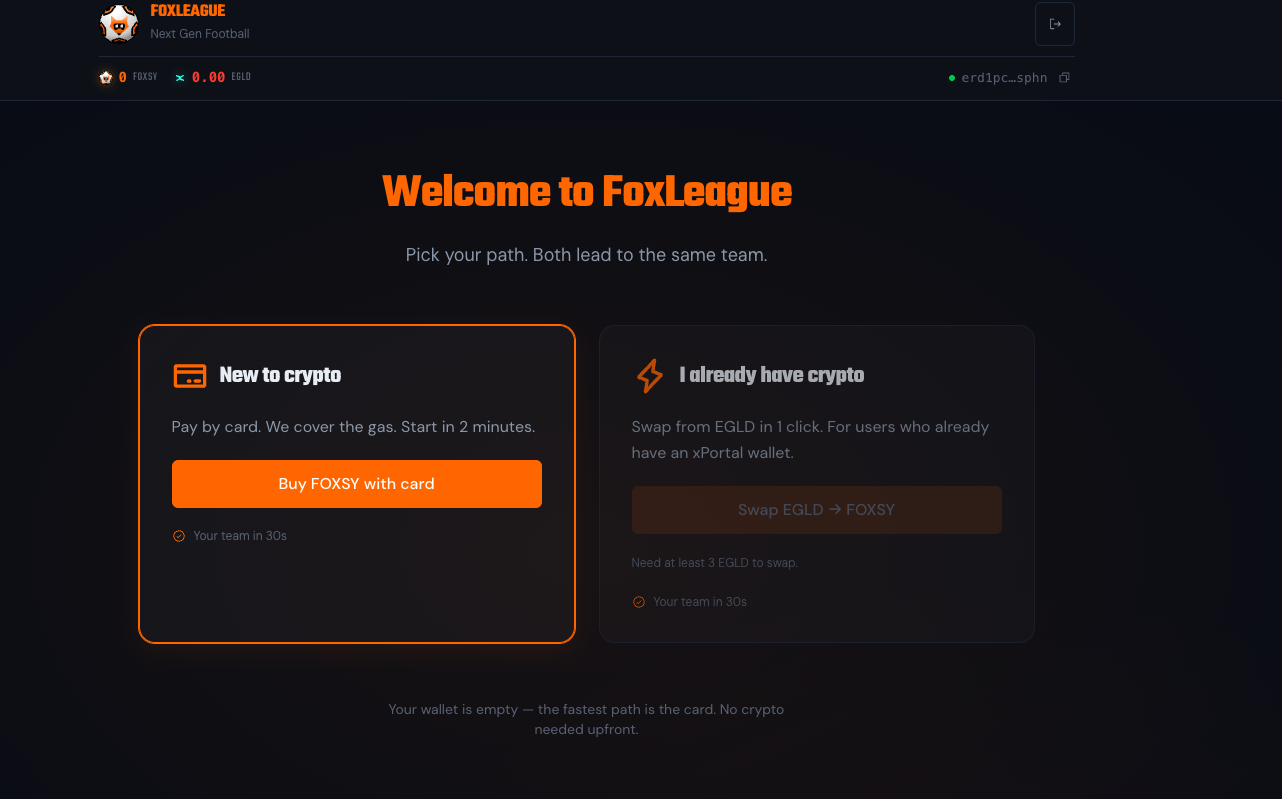
The very first thing you see after connecting your wallet is the registration screen. FoxLeague reads your FOXSY balance and adapts: with the fee already in your wallet you go straight to team creation. Otherwise it offers to swap the missing FOXSY from EGLD in the app. Either way the end state is the same: a team of 18 players in under a minute once the payment is signed.
The registration fee
Section titled “The registration fee”The one-time registration costs 5,000 FOXSY. You pay it once, from the wallet you connected, when you create your team. If your wallet already holds 5,000 FOXSY or more, FoxLeague skips the chooser and takes you straight to team creation.
Get FOXSY
Section titled “Get FOXSY”Registering needs the 5,000 FOXSY already in your wallet. The registration screen shows two cards.
| Use this when | What happens | |
|---|---|---|
| Swap EGLD → FOXSY (card I already have crypto) | Your wallet holds EGLD or WEGLD | A window buys the FOXSY you are missing on xExchange (exactly that amount from WEGLD, at least that amount from EGLD), in one transaction you sign in your wallet. See Swap EGLD or WEGLD for FOXSY. |
| Buy with card or bank | Coming soon | The Buy FOXSY with card or bank (coming soon) button stays disabled for now. Buying FOXSY by card or bank transfer is coming soon. |
You can also buy FOXSY on xExchange yourself (or on any exchange that lists it) and send it to the wallet you connected. Once at least 5,000 FOXSY sit in your wallet, come back to the tab: the balance pill in the header updates by itself and the team creation step unlocks.
Swap EGLD or WEGLD for FOXSY
Section titled “Swap EGLD or WEGLD for FOXSY”Click Swap EGLD → FOXSY on the card I already have crypto. The window Get FOXSY for your team opens over the registration screen and shows what your wallet is about to sign:
- You pay: the EGLD (or WEGLD) that leaves your wallet, with your balance under it
- You receive: the FOXSY you are missing, 5,000 for a new wallet
- Rate: what 1 EGLD buys right now on the xExchange FOXSY/WEGLD pool
- Max price move: 1% by default. If the FOXSY price moves more than that before your swap lands, nothing is swapped: your coins stay yours and you pay only the network fee
- Network fee: about 0.0006 EGLD (0.0005 with WEGLD), paid from your wallet. The swap is your own transaction; only the registration afterwards is paid by FoxLeague
- Contract: the xExchange contract your wallet will show you
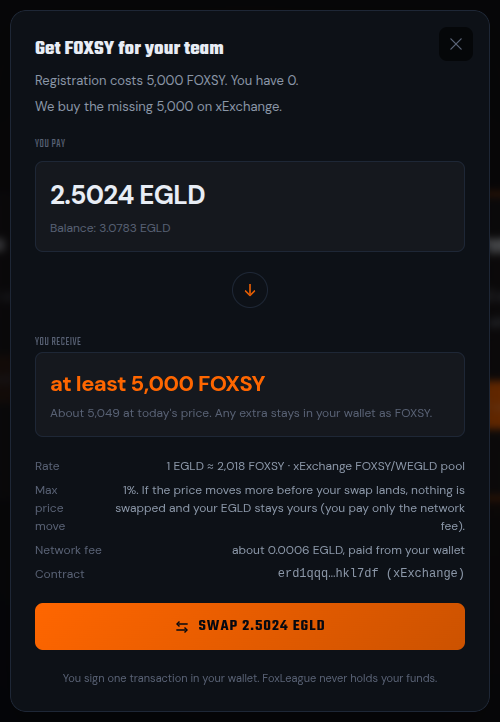
Click the orange SWAP button (it names the amount, for example SWAP 2.4447 EGLD) then approve in your wallet. The progress window goes from SIGN IN WALLET to SWAPPED!. Once the FOXSY is in your wallet the team creation step opens by itself.
| You pay with | What your wallet signs | What you get |
|---|---|---|
| EGLD | One transaction to the xExchange swap contract. The EGLD is wrapped then swapped in the same transaction. | At least the FOXSY you are missing. Any extra stays in your wallet as FOXSY. |
| WEGLD | One transfer to the xExchange FOXSY/WEGLD pool. | Exactly the FOXSY you are missing. The WEGLD that was not needed comes back in the same transaction. |
A wallet that holds enough of both pays with WEGLD; click Pay with EGLD instead to use EGLD. The EGLD path keeps 0.01 EGLD in your wallet for later network fees. The WEGLD path needs about 0.001 EGLD for its own fee, because every MultiversX fee is paid in EGLD.
The price is read again right before you sign. If it moved past the bound, the window shows the new price and sends nothing. A swap either happens completely or not at all: if it fails on chain, your EGLD or WEGLD comes back and only the network fee is spent. One swap at a time: while a swap of your wallet is still confirming, the button reads SWAP STILL CONFIRMING. While any other transaction from your wallet is still on its way to the network or while your wallet’s pending transactions cannot be checked, the window sends nothing and reads: Another transaction from your wallet is still on its way. Nothing was sent. Wait for it to land, then press Swap again.
Not enough EGLD
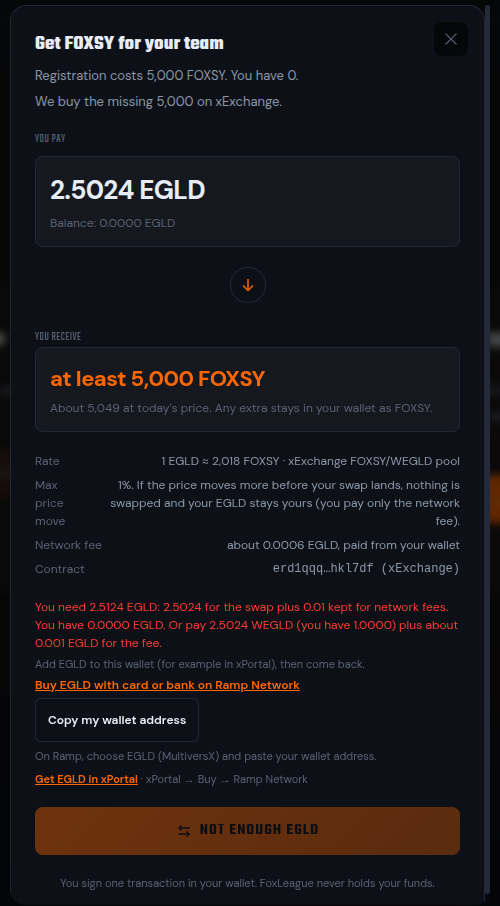
Section titled “Not enough EGLD”When your wallet cannot cover the swap, the button reads NOT ENOUGH EGLD and a red line names the exact amount you need. Under it you get three ways to add EGLD:
- Buy EGLD with card or bank on Ramp Network: Ramp’s public buy page. Choose EGLD (MultiversX) there
- Copy my wallet address: to paste into Ramp
- Get EGLD in xPortal: in the xPortal app, xPortal → Buy → Ramp Network
Network fees after registration
Section titled “Network fees after registration”Later actions that write to the chain (syncing stats, marketplace trades, tournament entries) are ordinary MultiversX transactions paid from your own EGLD. Each costs a small network fee, typically under 0.005 EGLD.
The first 101 wallets that registered with less than 0.01 EGLD received 0.1 EGLD from FoxLeague for their first network fees. That welcome bonus is spent: a manager who registers today gets no EGLD from FoxLeague and tops up EGLD themselves, through the swap window’s Buy EGLD with card or bank on Ramp Network link, in xPortal or from an exchange.
More FOXSY after registration
Section titled “More FOXSY after registration”On the Dashboard, the card NEED MORE FOXSY? has a Swap EGLD → FOXSY button. It opens the swap window Buy FOXSY, where you choose the amount. +1,000, +5,000 and +10,000 add to it; you can also type a whole number. The price, the bound plus the EGLD or WEGLD choice follow the amount, exactly as above. The window names the most FOXSY one swap may buy; above it the button reads AMOUNT TOO LARGE. An amount the pool cannot fill within 5% of its price reads AMOUNT TOO LARGE FOR THE POOL. After the swap your FOXSY balance in the header updates by itself. Buying FOXSY by card or bank is still coming soon there too.
Team creation
Section titled “Team creation”With 5,000 FOXSY in your wallet, the onboarding wizard moves through three short steps: Team Name → Generate Badge → Pay & Create.
- Team name: 3 to 15 characters. You can rename later from Settings
- Generate badge: an AI-generated team crest based on your name. Click Regenerate Badge to try another: free during onboarding, up to 5 tries per wallet, at most 3 every 10 minutes. Generation gives up after 30 seconds. If it fails or the AI declines your name, try again, pick a different team name or use Skip badge to register without one
- Accept terms: tick I am 18 or older and agree to the Terms of Use and Privacy Policy to unlock the Pay button. The Fair Play Rules apply to every manager from this moment on.
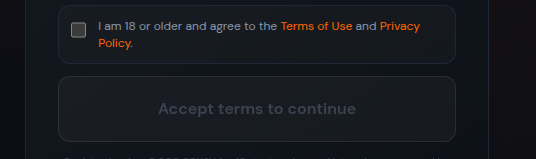
- Pay & Create: once the box is ticked the button flips to Pay 5,000 FOXSY & Create Team. Click it and your wallet pops up to sign
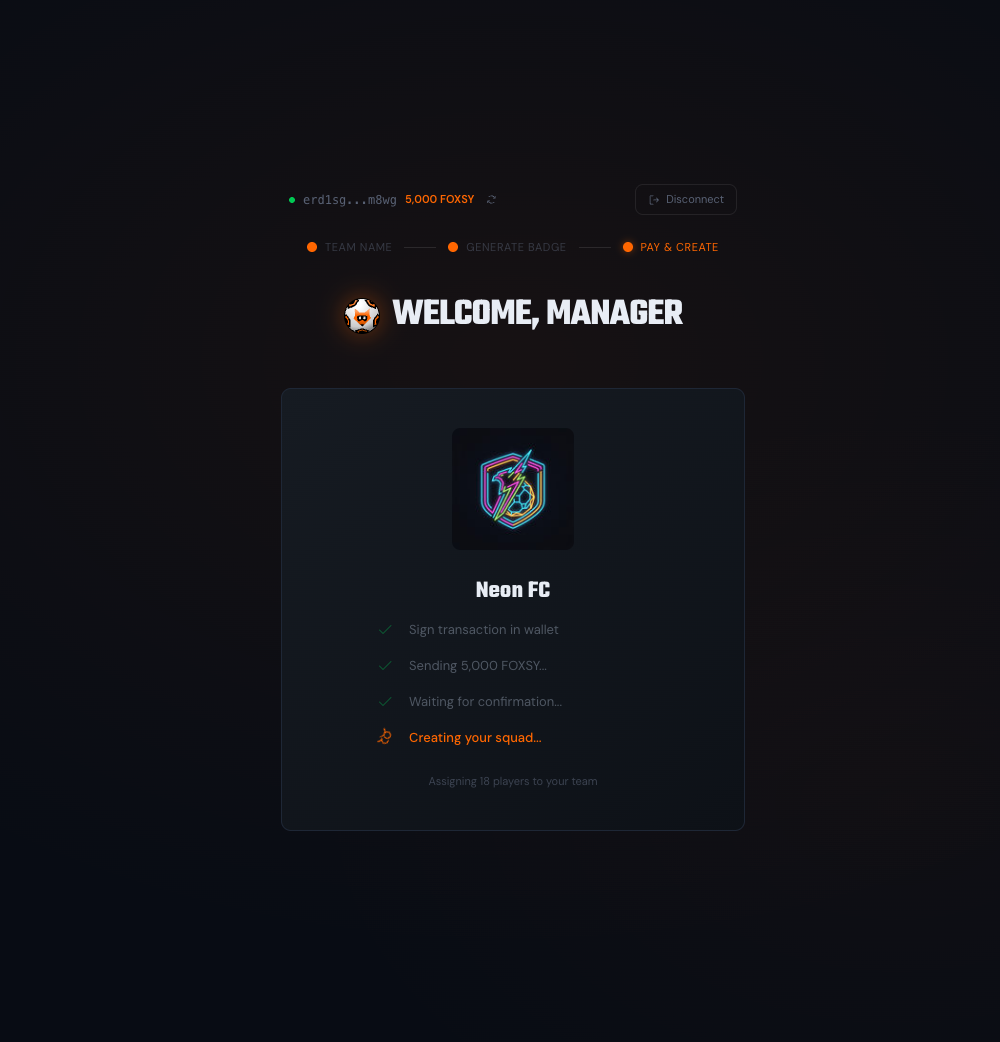
Approve in your wallet. The 5,000 FOXSY transfer to the registration smart contract, the relayer pays the gas and the squad minting kicks in:
- Sign transaction in wallet
- Sending 5,000 FOXSY…
- Waiting for confirmation…
- Creating your squad…
A few seconds later you land on the Dashboard with your full 18-player roster. You’re ready to build your first squad and play your first match.
One wallet receives one starter squad. The players contract enforces it: a wallet that has already paid the fee or already received its starter squad cannot register again, even after it sells or transfers those players.
What changes the buttons
Section titled “What changes the buttons”The registration screen is state-aware. It adapts to your wallet and to live system conditions:
- Already hold 5,000 FOXSY → chooser skipped, straight to team creation
- Less than 5,000 FOXSY → the card I already have crypto opens the swap window. It is highlighted when your wallet holds enough EGLD or WEGLD for the swap. Buy FOXSY with card or bank (coming soon) stays disabled. Otherwise the line under the cards names the 5,000 FOXSY your wallet needs, with the ways to add EGLD
- Swap temporarily unavailable → the xExchange pool is paused or its price is far from normal. Try again in a few minutes
- Swap EGLD → FOXSY (coming soon) → the in-app swap is paused. Use an exchange meanwhile
- The relayer accepts 3 registration attempts per wallet per 10 minutes. Wait ten minutes and try again. (a red line after Pay & Create) → wait ten minutes, then press Pay & Create again
- Onboarding closed for today → the relayer has a daily cap across all users. Try again tomorrow or ping the team on Telegram
- An earlier transaction from this wallet is still waiting on the network (or one of the other texts in When a payment signs nothing) → your wallet was not asked to sign and nothing was sent. Wait as the text says, then press Pay & Create again