
1v1 Challenges
A 1v1 Challenge is a one-match showdown between two players. You stake FOXSY, your opponent matches the stake and the winner takes 90% of the combined pool. The platform keeps 10% as a fee. The create form always shows the live split before you confirm. The loser gets nothing as these are winner-takes-most stakes.
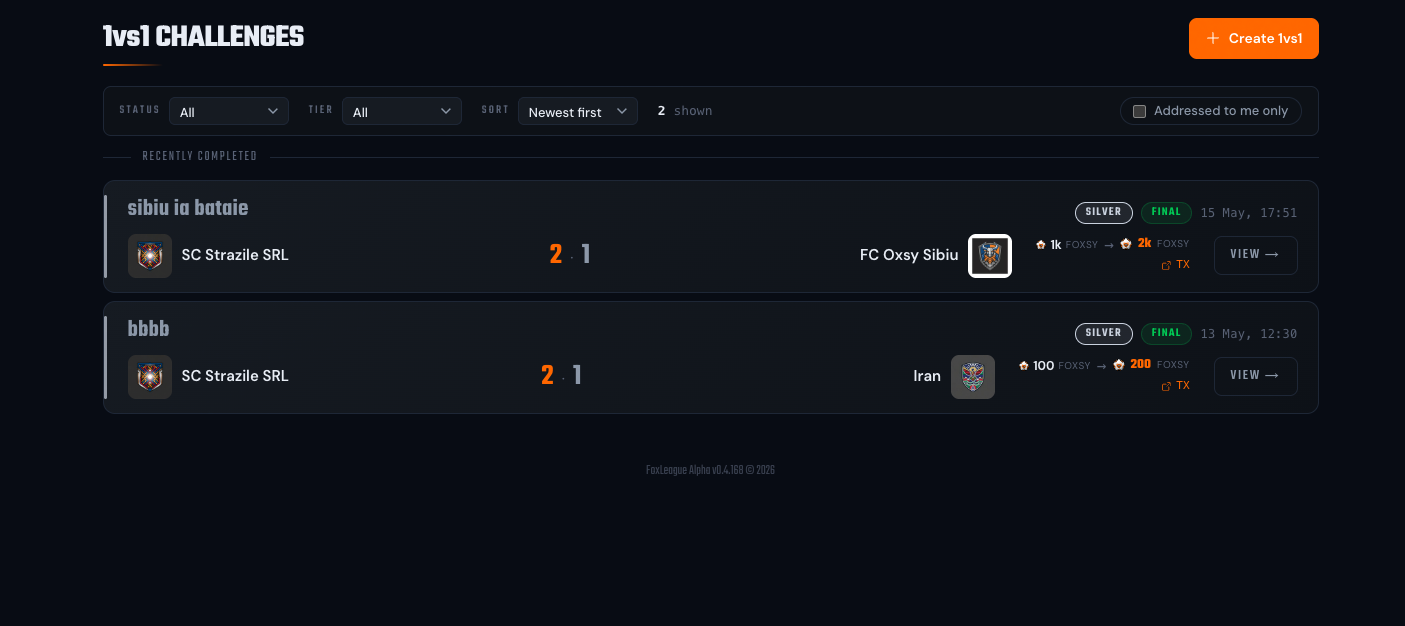
1v1 Challenges live at their own route, /challenges, with a crossed-swords icon in the sidebar.
How it works
Section titled “How it works”- Open 1vs1 Challenges from the sidebar (icon next to Play Match)
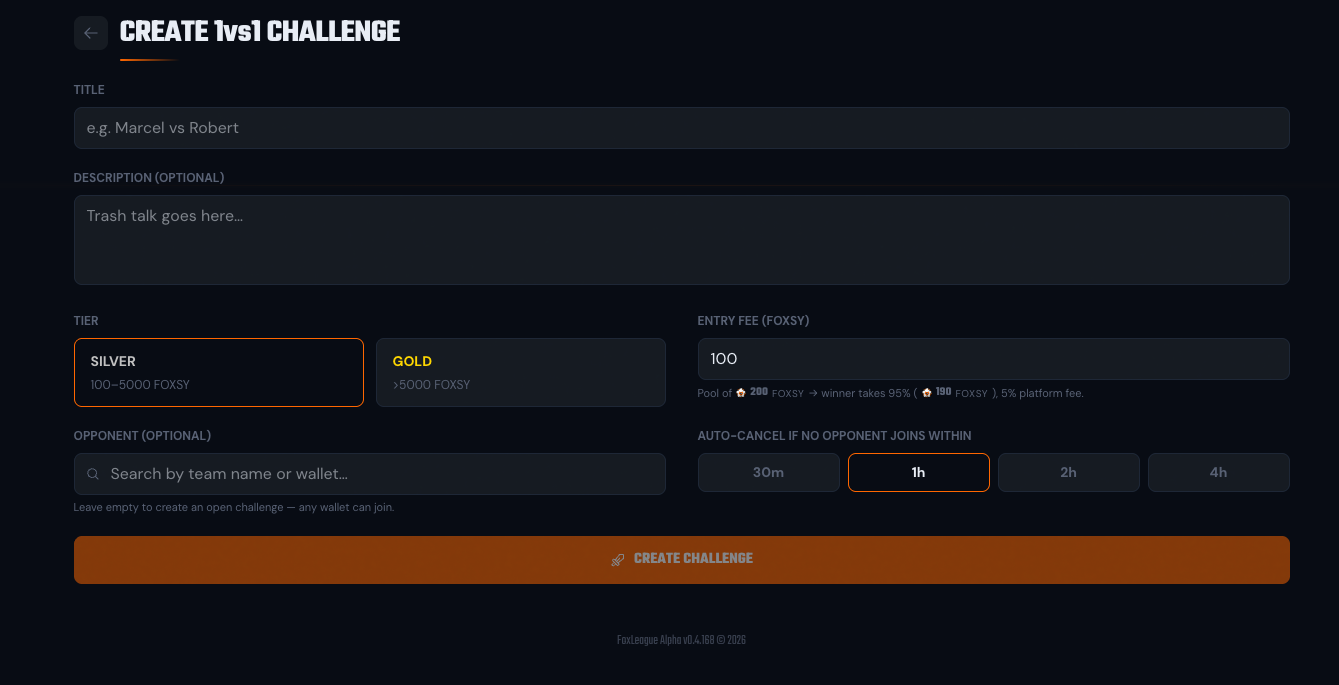
- Click Create 1vs1
- Give the challenge a title (e.g. “Bob vs Alice”) and optionally a short description. Trash talk lives here
- Pick a tier: Silver or Gold. Bronze is unlocked only for free developer challenges (both players run their uploaded binary, nothing is staked)
- Pick the entry fee within the tier’s bounds (Silver 1,000-4,999 FOXSY, Gold 5,000+). The form shows a live pool calculator next to the input (exactly how much the winner takes home and how much goes to the platform fee)
- Optionally pick a specific opponent by searching their team name or wallet address (leave empty for an open challenge, so any wallet can take it)
- Optionally set an OVR range (a minimum and/or a maximum best XI OVR), so only teams of your strength can accept. See OVR range
- Pick a deadline: 30 min / 1 h / 2 h / 4 h (default 30 min)
- Click Create challenge: your FOXSY entry fee is locked into the challenge pool
Your wallet asks for one signature (the entry fee): that one transaction creates the challenge on chain and seats you in it. Other players see the challenge only once your payment has landed; until then your lobby and the challenge page show it as Waiting for your payment.
A developer challenge keeps the earlier flow: the game creates the challenge first, then your one signature pays the entry fee and seats you.
- You closed the wallet without signing: nothing is charged and nothing is created. Press Try again to sign the same challenge. Before it opens your wallet again, the game checks the chain, so a first signature that is still on its way is never paid twice.
- Your earlier challenge is still waiting for its payment: the form says so and counts down until you can start a different one, with a link to the pending challenge.
- Your payment is not confirmed yet: the challenge opens as soon as it lands, even if you leave the page; nothing is charged twice. Closing the tab in that moment asks you to stay first.
The entry fee is written to the tournaments contract when the challenge is created. Accepting it transfers exactly that amount, so a payment that is even slightly off is rejected on chain rather than half-seating you.
Your synced XI is captured as a snapshot at the match’s strategy lock, the same way regular tournament matches work. A 1v1 normally kicks off a few minutes after the opponent accepts, so its lineup is captured right then, not when you create the challenge. Training and syncing done before the opponent accepts still count; anything after the lock doesn’t.
Targeted vs open challenges
Section titled “Targeted vs open challenges”You pick at creation time whether the challenge is targeted at one specific opponent or open for anyone to take:
- Targeted: only the chosen wallet/team can accept. In the lobby, other users see a Locked chip in place of the JOIN button; on the detail page a Locked badge sits next to the tier badge and the join area reads Locked to opponent. The opponent’s name is not shown on the card.
- Open: anyone can accept. The first player to confirm and pay the matching entry fee fills the slot.
Either way, home and away are decided by rating once the challenge fills: the higher-rated (ELO) player is seeded first and plays as the home team. Creating the challenge doesn’t guarantee you the home spot.
OVR range (best XI)
Section titled “OVR range (best XI)”A challenge can carry an optional minimum and/or maximum team OVR (whole numbers from 1 to 100). Say your team is around 32 and you do not want a team of 50 to take your challenge: set the maximum to 35. The OVR that counts is a team’s best XI OVR: the average OVR of the strongest XI its manager can field from the cards they own right now, whatever the saved lineup. Each card plays only in its own position; for every formation in Tactics the best cards fill its slots, the highest average counts and cards listed for sale count too. A manager whose cards fill no formation is measured on the cards of the formation they fill most. The Tournaments page has the details.
- It is checked once, when the opponent accepts (and when you take your own seat). A team outside the range cannot accept. A paid entry sent anyway is refunded.
- Nothing is checked after that: lineup changes and player growth before the match are never measured against it.
- You always play your own challenge, so your best XI OVR must be inside the range you set. The create form shows your best XI next to the two inputs.
- A developer challenge takes no range.
- The challenge card and its page show the range as a chip (OVR ≤ 35). A team outside it sees Join greyed with the reason.
- Every challenge card still to be played shows each team’s Best XI OVR with the formation it comes from under it, so you can see the strength of a challenger before you accept. The lobby of the challenge shows the same number. It is the one team OVR the app shows everywhere: see your team OVR.
- Nobody accepting? While the challenge is open (before its deadline), you can widen the range from its page: Widen the range sits next to the chip. Lower the minimum or raise the maximum. Clear a field to remove that bound. It never gets narrower: a higher minimum, a lower maximum or a new bound on a side that has none is refused. An admin can widen it too. See Widening the range.
Prize split
Section titled “Prize split”The current split:
| Place | Share |
|---|---|
| Winner | 90% of pool |
| Loser | 0% |
| Platform fee | 10% |
Example: both players stake 1,000 FOXSY → 2,000 FOXSY pool → winner gets 1,800 FOXSY, platform takes 200 FOXSY.
A quarter of the platform fee (2.5% of the pool, so 50 FOXSY in the example above) is paid as a creator royalty to the provider of the AI binary the match was played with. It is taken from the fee and is sent in the same distribution transaction as the prize, so it never reduces what the winner receives.
The match
Section titled “The match”When the opponent accepts, the match kicks off and plays out exactly like a regular FoxLeague match, streaming live to both players. Kickoff is normally scheduled a few minutes later; the wait grows when several tournament matches kick off in the next five minutes. If either player already has another match booked within the next 2 hours, the 1v1 slides to the next free slot after it, keeping a 20-minute window clear for its own broadcast, so the countdown can run longer than expected.
- Match length: ~10 minutes minimum (longer if it goes to extra time and penalties)
- Both players watch the live game on the challenge detail page
Draws: extra time + penalties
Section titled “Draws: extra time + penalties”A 1v1 must produce a winner. If regular time ends level:
- Extra time is played first: two halves of 100 seconds
- If still tied, a penalty shootout decides the winner: five kicks each, then sudden death for up to 20 more rounds (the same mechanism as in tournament knockouts)
A 1v1 is never decided by lot.
The challenge detail page and the lobby card show the resolution method in the full-time badge: FT (a.e.t.) after extra time, FT (penalties) after a shootout. A game settled in regular time shows a bare FT.
Prize delivery
Section titled “Prize delivery”The winner’s 90% payout is distributed automatically to their wallet, about 3 minutes (180 seconds) after the match’s broadcast ends. The challenge detail page shows a distribute transaction link once the payout fires. No claim action required.
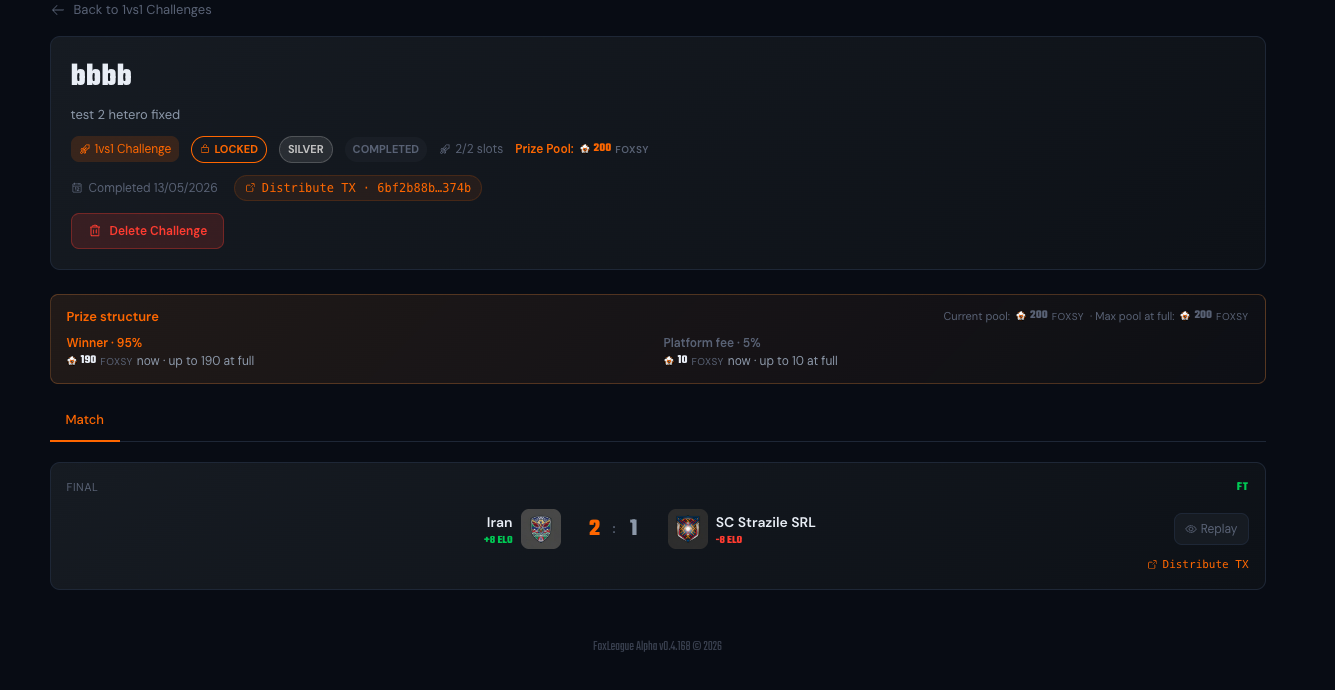
The Prize structure card on the detail page always shows the current pool next to the max pool at full. While the challenge is still waiting for an opponent, the pool line reads as the creator’s stake only (“Current pool: 1k FOXSY · Max pool at full: 2k FOXSY” in a 1,000-vs-1,000 example) and each share row shows the same two views (“900 FOXSY now · up to 1800 at full” for the winner). Once the opponent locks in, both halves are in and the “now” value equals the “at full” value.
Deadline expiry (automatic refund)
Section titled “Deadline expiry (automatic refund)”If the deadline passes and nobody has accepted (or the targeted opponent never joined):
- The challenge auto-cancels
- The creator’s entry fee is refunded in full to their wallet
- No platform fee is taken on cancellation
You’ll see the refund transaction in your wallet history. The challenge shows a Cancelled chip in the lobby; no reason text is displayed.
The refund is exact: the contract returns the same amount it holds for your entry. If the game server cannot push it back to you, your entry stays in the contract and you can pull it yourself by calling the contract’s claimRefund endpoint with the challenge id. An entry that landed on chain but never took a seat (for example a join whose page was closed before it was confirmed) shows a Claim my entry back button to the wallet that paid it, on the page of the completed challenge.
While your challenge still waits for an opponent and its deadline has not passed, its page shows Delete Challenge. Deleting it refunds any entry fee it holds on chain.
If your own entry fee never went through (the wallet never asked you to sign or you closed the tab first), the challenge stays open with no seat taken until the game cancels it (see the next section). It counts as your one active 1v1 until then. Its page shows you Join to pay your entry and Delete Challenge to remove it at once.
Unpaid challenge (automatic cancel)
Section titled “Unpaid challenge (automatic cancel)”A Silver or Gold challenge is created first. Your wallet then signs your entry fee, which takes your seat. If you still hold no seat 20 minutes after the challenge opened and your entry fee is not in the contract (the wallet prompt never appeared or you closed the tab before paying), the challenge is cancelled automatically:
- It stops counting as your one active challenge, so you can create a new one at once instead of waiting for the deadline.
- An entry fee that reaches the contract after the cancel is refunded to your wallet automatically.
- Nobody can accept a challenge before its creator holds a seat, so no opponent is affected.
- You get a Challenge cancelled notification.
While your entry fee is in the contract the challenge is not cancelled this way: the game gives you the seat it paid for, even when you closed the page before your join was confirmed. A challenge you hold a seat in is never cancelled this way: it waits for an opponent until its deadline as usual.
One active challenge at a time
Section titled “One active challenge at a time”You can have only 1 open or in-progress 1v1 challenge at a time per wallet. The game strictly enforces this. Trying to create a second while one is live shows an error. The cap prevents players from spamming challenges and ensures every 1v1 remains a focused, high-stakes rivalry.
Cancelled or finished challenges don’t count. Once your active one resolves (win, loss, deadline expiry or you delete it), you can create another.
ELO impact
Section titled “ELO impact”1v1 results move ELO at the tournament K-factor of the challenge’s tier: a Silver challenge uses the Silver K-factor (12), a Gold challenge the Gold K-factor (18). This is intentional as 1v1s are high-stakes and should weigh accordingly in your ranking.
- Win → significant ELO gain
- Loss → significant ELO loss
- Draws are impossible in 1v1 (extra time/penalties always resolve)
Snapshot rules (same as tournaments)
Section titled “Snapshot rules (same as tournaments)”Once the challenge fills and its strategy lock passes:
- Your synced XI is locked for this match
- Training/sync after the lock doesn’t apply to this match
- Individual players are not locked. Instead your account is blocked from starting casual or ranked matches from 1 hour before the 1v1 (or any of your tournament matches) is scheduled until its broadcast ends
- An open challenge still waiting for an opponent doesn’t restrict you at all
- You cannot create or join a 1v1 while you are busy with a tournament: from 1 hour before one of your own tournament matches kicks off until its broadcast ends. In a tournament with a group stage every team of a group also stays busy from 1 hour before the group’s last match until every match of the group has ended. In a Swiss tournament you stay busy from 1 hour before your match until every match of your round has ended. The span of the whole tournament does not count. The error reads “You have a tournament match within the hour”
- Once the broadcast ends, you’re free to play again immediately
After the challenge
Section titled “After the challenge”The completed challenge appears in:
- Your Match History (with the 1v1 badge, both players’ team names, score, decision method)
- Your opponent’s Match History (mirror entry)
- The 1v1 lobby under the Completed filter (newest first)
There’s no separate Hall of Fame for 1v1. They’re tracked alongside regular ranked / tournament matches in your career stats.
- Target someone in your ELO range. Picking a much weaker opponent looks like sandbagging; picking someone much stronger is high-variance gambling.
- Sync before the opponent accepts. The snapshot freezes whatever’s synced at the match’s strategy lock, normally right after the challenge fills. Train/sync first, then challenge, because an open challenge can be accepted at any moment.
- Pick a deadline you’ll honor. If you target someone, give them time to see and respond. 30 min is aggressive; 1-2 h is conventional.
- Check the live entry-fee bounds in the create form.
- Mind the 1-hour busy window. Casual and ranked play is blocked from 1 hour before your 1v1 kicks off until its broadcast ends, so plan around the deadline window. Overlapping tournament matches are handled by the scheduler, which slides the 1v1 kickoff past them.